
Why Your Website is Bleeding Money (And the 5 Fixes That Actually Work)
TrustByte Team
January 27, 2026
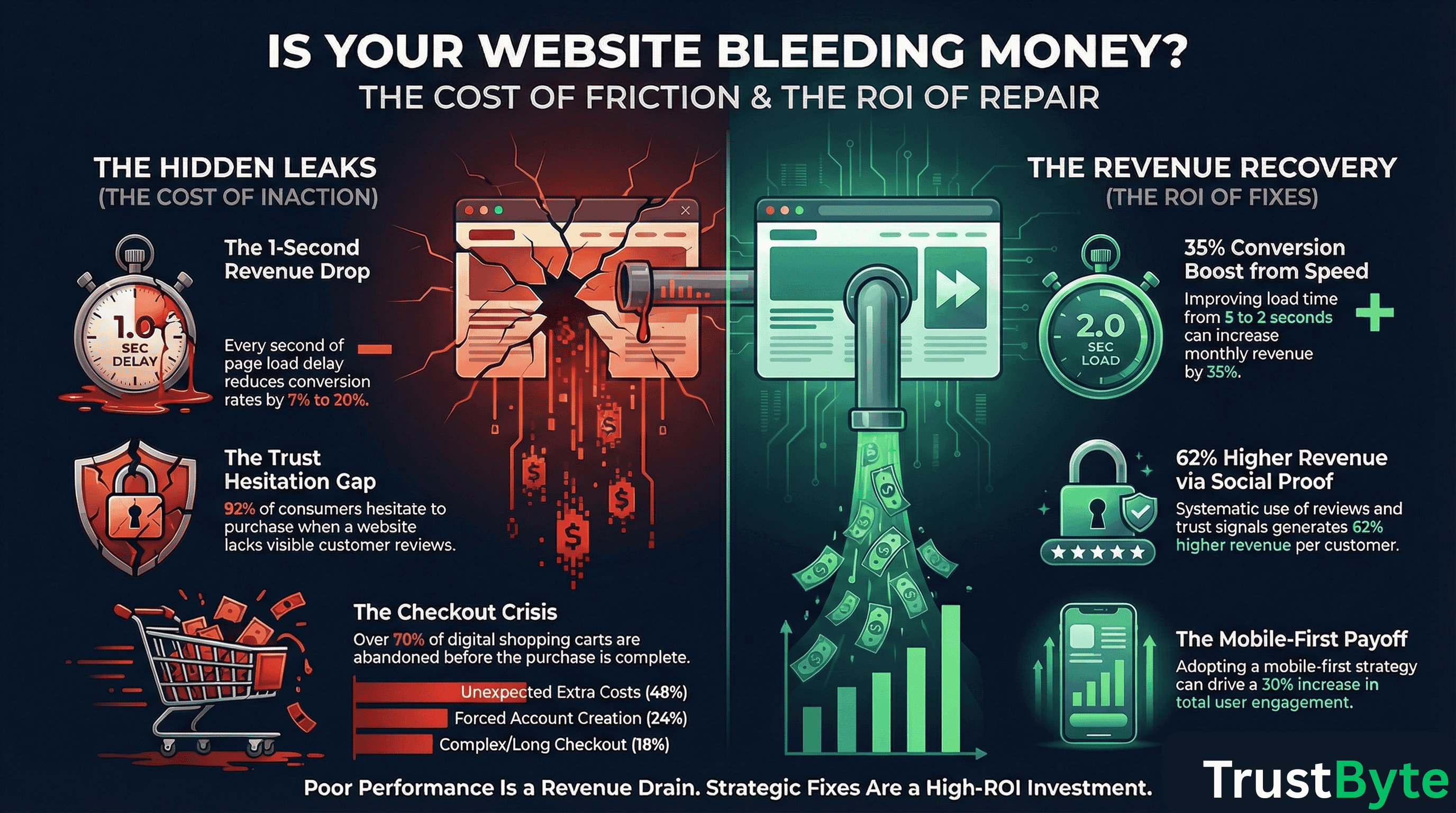
Why Your Website is Bleeding Money (And the 5 Fixes That Actually Work)
Imagine this: Your marketing team just secured 10,000 new visitors to your website this month. Impressive, right? But here's the brutal truth—if your website converts at the industry average of 2.35%, you're only getting 235 customers. That means 9,765 potential customers are slipping through your fingers.
Even worse? Studies show that top-performing websites convert at 11% or higher. If you were in that league, those same 10,000 visitors would generate 1,100 customers—almost 5x more revenue from the exact same traffic.
The difference isn't more ads, better products, or lower prices. It's website performance. And every day these issues go unfixed, you're hemorrhaging revenue. Let's look at the five biggest culprits draining your bank account—and exactly how to fix them.
Fix #1: Your Website is Too Slow (And It's Costing You 7% Per Second)
The Problem:
Every single second of delay in page load time reduces conversions by 7-20%. That's not a typo. In 2025, 53% of users abandon a page if it takes more than 3 seconds to load. On mobile—where 73% of e-commerce traffic comes from—a 1-second delay can slash conversions by 20%.
Consider these real numbers:
- Amazon found that every 100ms of delay costs them 1% in sales
- Walmart saw a 2% increase in conversions for every 1-second improvement
- A site that loads in 1 second has almost a 40% conversion rate, but at 3 seconds, it drops to 29%
- B2B sites loading in 1 second convert 3x better than sites loading in 5 seconds
The Fix:
- Compress and optimize images: Images account for nearly a third of page weight. Use modern formats like WebP and implement lazy loading
- Minimize JavaScript and CSS: 92% of sites have third-party scripts that slow everything down. Audit and remove unnecessary ones
- Use a CDN: Content Delivery Networks reduce load times by serving content from servers closer to your users
- Target under 2 seconds: Aim for under 2 seconds on desktop and under 3 seconds on mobile. Use Google PageSpeed Insights or GTmetrix to monitor
- Optimize Core Web Vitals: Focus on LCP (Largest Contentful Paint under 2.5s), INP (Interaction to Next Paint), and CLS (Cumulative Layout Shift under 0.1)
The ROI: If you're currently at 5 seconds and drop to 2 seconds, you could see a 15-35% boost in conversions. For a business making $100k/month, that's an extra $15-35k in monthly revenue.
Fix #2: Your Mobile Experience is Broken
The Problem:
More than 75% of all e-commerce sales are projected to come from mobile devices in 2025. Yet mobile conversion rates are consistently lower than desktop—averaging 1.82% compared to 3% on desktop. Why? Because most websites were designed for desktop first, and mobile users are getting a broken, frustrating experience.
The damage:
- Mobile users have 10+ percentage points higher cart abandonment than desktop users
- Over 90% of smartphone users won't continue shopping if the mobile experience is poor
- Google prioritizes mobile-first indexing—a poor mobile experience tanks your SEO
- Non-responsive design can lead to up to a 22% drop in conversions
The Fix:
- Implement responsive design: Your site must automatically adjust to any screen size. Use flexible grids and media queries
- Optimize tap targets: Buttons need to be at least 48x48 pixels. Tiny buttons = frustrated users who can't click
- Simplify navigation: Use hamburger menus, collapsible sections, and clear hierarchy. Mobile screens have limited space
- Test across devices: Don't just test on your iPhone. Check Android, various screen sizes, and different browsers
- Use mobile-first design: Design for mobile first, then scale up to desktop. This ensures your core experience works for most users
The ROI: Businesses adopting mobile-first strategies see up to 30% increases in engagement and conversions. With 75% of traffic mobile, this isn't optional—it's survival.
Fix #3: Your Navigation is a Maze (And Users Are Leaving)
The Problem:
Poor navigation is one of the top reasons for high bounce rates. When visitors can't find what they're looking for in seconds, they leave. Studies show that 49% of customers abandon confusing sites, and 88% won't return after a poor user experience.
The warning signs:
- High bounce rates (above 50% for most industries)
- Users only viewing one page before leaving
- Low time on site despite high traffic
- 58-67% of sites have mediocre or poor navigation (according to 2025 Baymard Institute benchmarks)
The Fix:
- Simplify your menu: Limit top-level options to 5-7 items. Too many choices create decision paralysis
- Use clear labels: Avoid jargon. Use plain language that your customers actually use
- Implement breadcrumbs: Show users where they are in your site hierarchy
- Add search functionality: A prominent search bar helps users find exactly what they want
- Make CTAs obvious: Every page should have a clear next step. Don't make users hunt for what to do
- Audit with heatmaps: Use tools like Hotjar or Crazy Egg to see where users actually click and where they get stuck
The ROI: Improving mobile navigation alone can reduce bounce rates by 30%. For businesses with traffic issues, fixing navigation is often the single highest-ROI change.
Fix #4: You're Missing Trust Signals (And Losing Sales)
The Problem:
In 2025, 92% of consumers hesitate to buy without reviews. Yet many websites lack basic trust signals. The result? Visitors who want to buy simply don't feel safe doing it—especially on mobile where 19% abandon due to credit card security concerns.
The data is clear:
- 93% of consumers say online reviews impact purchase decisions
- Products with 5+ reviews are 270% more likely to be purchased
- Video testimonials increase conversions by 80%
- Adding trust signals can reduce cart abandonment by up to 28%
- 18% of cart abandonment happens because customers don't trust the site with their credit card
The Fix:
- Display customer reviews prominently: Put them on product pages, homepage, and checkout. Aim for 50+ reviews over time
- Show security badges: SSL certificates, payment logos (Visa, Mastercard, PayPal), and security seals near checkout
- Add social proof: "Join 10,000+ happy customers" or "Featured in [major publication]"
- Include testimonials: Real customer quotes with names and photos. Video testimonials are 80% more effective
- Showcase client logos: If you work with known brands, display their logos (with permission)
- Clear refund policy: Make your return/refund policy easy to find. Money-back guarantees reduce perceived risk
- Show real-time activity: "3 people bought this in the last hour" notifications boost conversions by 10-15%
The ROI: Companies with systematic social proof across all touchpoints see 62% higher revenue per customer. Trust signals are low-hanging fruit with massive impact.
Fix #5: Your Checkout Process is a Conversion Killer
The Problem:
The average shopping cart abandonment rate in 2025 is 70.22%. That means 7 out of 10 people who add items to their cart never complete the purchase. The cost? Retailers lose approximately $18 billion annually to cart abandonment.
The top reasons people abandon:
- 48% abandon due to unexpected extra costs (shipping, taxes, fees)
- 24% leave because they're forced to create an account
- 18% abandon due to complicated or lengthy checkout
- 21% abandon because delivery is too slow
- 13% leave due to limited payment options
The Fix:
- Show all costs upfront: Display shipping and taxes early. Hidden costs are the #1 reason for abandonment
- Offer guest checkout: Don't force account creation. 24% of people abandon because of this
- Simplify the form: Ideal checkout is 12-14 form fields max. Every extra field reduces conversions
- Multiple payment options: Include digital wallets (Apple Pay, Google Pay), Buy Now Pay Later, and major cards
- Add progress indicators: Show users where they are in the checkout process (Step 2 of 3)
- One-page checkout: Sites with single-page checkouts see up to 21% better conversion rates
- Exit-intent popups: Offer a discount or free shipping when users try to leave. This can recover up to 53% of abandoned carts
- Cart abandonment emails: Send automated reminders with 39% open rates and 10.7% conversion rates
The ROI: Checkout optimization can boost conversions by 35.62%. Up to $260 billion in lost revenue is potentially recoverable with better checkout design. Even a 10% reduction in cart abandonment can add thousands to your monthly revenue.
The Bottom Line: Stop the Bleeding
Your website isn't just a digital brochure—it's your most powerful sales tool. Every day these five problems go unfixed, you're losing money. The good news? Unlike most business challenges, these are completely within your control to fix.
Here's your action plan:
- Start with speed: Use Google PageSpeed Insights to get your baseline. Aim to drop below 3 seconds
- Fix mobile next: Test your site on multiple devices. If buttons are hard to tap or text is unreadable, fix it now
- Simplify navigation: Get 5 people to try finding something on your site. If they struggle, your navigation is broken
- Add trust signals: Start collecting reviews today. Add security badges to your checkout
- Optimize checkout: Show all costs upfront, offer guest checkout, and reduce form fields
Remember: companies spend $92 on customer acquisition for every $1 spent on conversion optimization. That's backwards. The smartest move you can make is fixing what you already have before spending another dollar on ads.
Your website either makes you money or costs you money. There's no in-between. Which one is yours?
Need Help Fixing Your Website?
At TrustByte, we specialize in building fast, conversion-optimized websites that turn visitors into customers. We've helped businesses increase their conversion rates by 30-150% by fixing exactly these issues.
Contact us for a free website performance audit: trustbyteltd.com/contact